The Word Wave Mode: Kinetic Type Needs an Overshoot
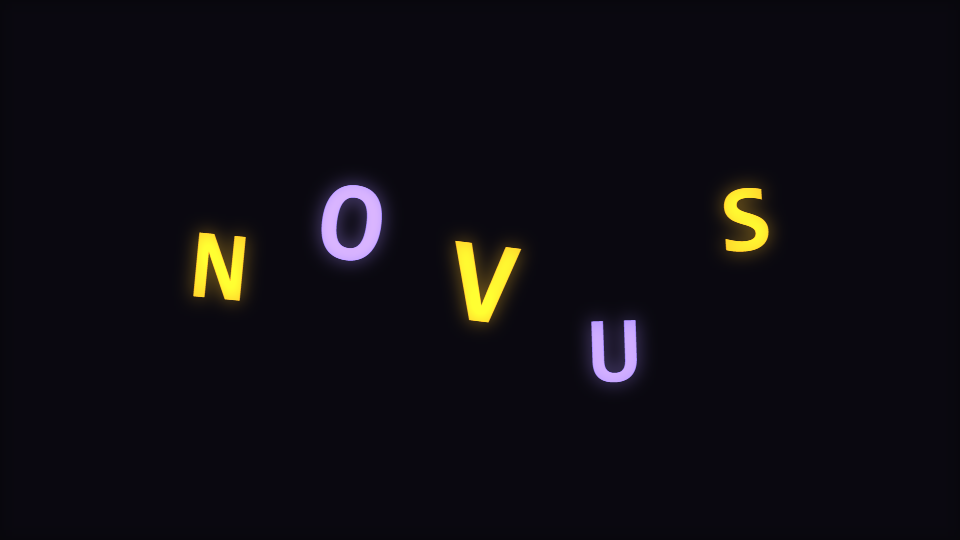
Word Wave pops each letter on an ease that overshoots and settles, and lights them in groups so the word reads across the bar. Here is the difference between kinetic type and text that scales with the volume.
Word Wave is the mode in the Character Motion engine that puts your own words on screen: words deform along a beat-mapped waveform baseline. It is the one place in the catalogue where the subject of the visual is text you typed.
Overshoot is the whole difference
A letter that tracks the beat envelope grows and shrinks with the music. That is not kinetic typography; that is text bound to a volume meter. What makes type read as kinetic is that it goes slightly too far and comes back.
So each letter owns a decay envelope, and the value read from it is passed through an ease that overshoots past one before settling. The overshoot feeds the letter's vertical bounce, its extra scale and an extra rotation, all at once. It is a handful of arithmetic and it is the entire reason the mode looks designed rather than driven.
The word reads across the bar, not on every beat
Letters are triggered in round-robin groups rather than all together, so successive beats light successive parts of the word. Set a short word and every letter gets its own beat; set a long one and they move in clusters. Either way you are watching the word be typed by the music rather than blink.
Where a letter sits
Letters are spread across a span derived from Letter spacing and the length of your Display text, bounded so a long string cannot run off the sides. Two waves are then added to the vertical position: a slow sine across the word driven by Path deformation, and a faster one locked to the beat phase whose depth rises with the energy. The pop subtracts from that, so a letter jumps up out of the wave rather than along it.
Letters are drawn from their middle, which is why the vertical swing is limited against the frame box minus a share of the glyph size rather than against the box itself. At a high path deformation the raw offset alone exceeded the half-height before the glyph was even measured, and half a letter has to fit above the highest one.
Controls that exist only here
- Display text is scoped to this mode alone in the engine. It is the letter source, and it is what decides how many letters there are. The engine's Character count control governs the glyph-grid modes, not this one.
- Letter spacing is likewise scoped here alone, and it competes with the span bound: past a certain string length, spacing stops widening the word because the whole arrangement is already at its maximum width.
- Path deformation shapes the wave, the per-letter rotation and the horizontal wobble together. This mode ships it at 0.62.
- Colour mode works here. Letters are painted with the per-element colour for their index, so duo, gradient and full spectrum all spread across the word rather than flattening it to the primary colour.
The primary audio route is in scope for this mode, which is not true of every mode in this engine: Primary audio source, Audio contribution and Audio dynamics all apply, so you can bind the letters to the band that actually carries the vocal rather than to the bass.
What it costs and what it needs from you
This engine is rated hard for setup in the catalogue, and that rating is honest: the mode does nothing useful until you have typed something. It is also the lightest engine in the catalogue by published budget, at 48 elements by default and 12 on mobile, because a word is a dozen glyphs rather than a thousand particles.
Use it for a title card, a hook line, an artist name over an intro, or a short refrain. For anything longer than a few words, a lyric video is the right surface instead, and Make a Lyric Video That Syncs covers that route. Open this mode at the template page or in the editor.
Reviewed by the editorial team. Report a correction.
Keep reading
Was this page helpful?
Anonymous. Only this page’s address and your yes/no are recorded, and only if you allowed analytics cookies.
Ready to make your own?
Open the editor, drop in a track, and export a watermark-free video: free, no account.
Open the Editor