The Kinetic Reveal Mode: Assembling a Mark Across a Bar
Kinetic Reveal lights wedges around your artwork in turn so the mark assembles over a four-beat bar rather than fading in. Here is the bar clock, and the rule that keeps geometry off the logo.
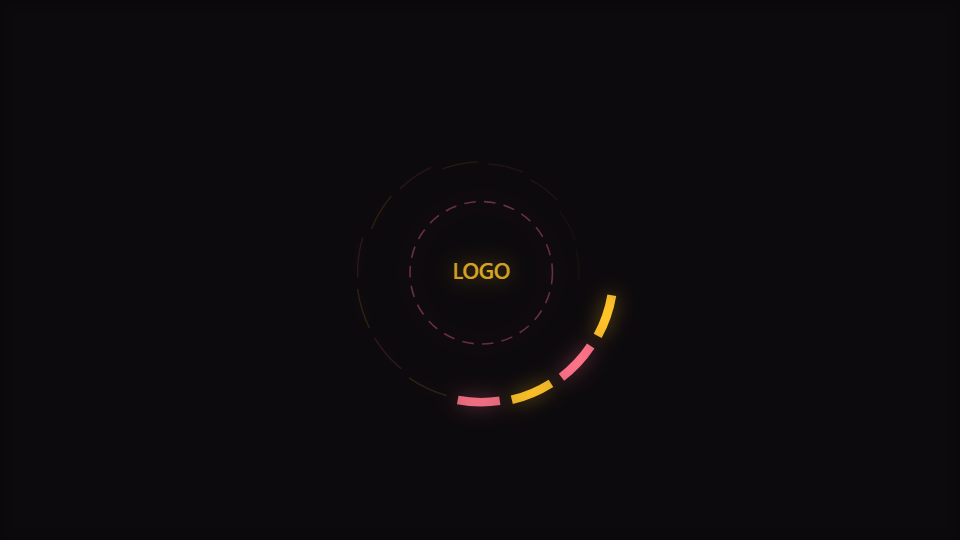
Kinetic Reveal is the mode in the Logo engine where wedges light in turn so the mark assembles across a bar. It is the one scene in the catalogue whose timing is measured in bars rather than beats or seconds.
The engine, first
It is worth being clear about what this engine is, because three unrelated things in this product have been called the logo. One is a document overlay composited on top of the canvas, which no engine reads. One is a layer type in the node-graph editor. One is a reserved centre in another engine with nothing in it.
This engine is the one where the artwork is the subject. Every mode sizes its geometry from a radius derived from your artwork and your clearance setting, so nothing can overlap the logo regardless of which control you move: change the scale or the clearance and the geometry moves out of the way rather than crossing it.
The reserved radius is a corner, not a side
Your artwork is fitted into a centred square whose side is a fraction of the frame. The corners of that square reach further from the centre than its sides do, by a factor of the square root of a half, and that corner distance is the radius geometry actually has to clear. Clearing the side would leave the corners of a wide mark poking into the ring.
A bar clock, not a beat clock
The reveal is driven by the position within a four-beat bar, which runs continuously from zero to one across the bar and then restarts. Each wedge has a fixed position around the ring, and a wedge is fully lit once the bar has passed its position; the ones still ahead of the playhead are drawn dim rather than hidden.
That is a deliberately musical choice. A reveal on a timer drifts against the track. A reveal on every beat is a blink. A reveal across a bar lands its completion on the downbeat, every bar, which is where a viewer expects an arrival. It also means the mode restarts itself rather than resolving, which is what you want for a loop.
The wedge count is derived from Rings, multiplied and bounded, so that control is really the resolution of the reveal. This mode ships 5, which gives you a satisfying number of steps across a bar without the ring turning into a solid circle.
Each wedge still reads the music
A wedge is not simply on or off. Its radius, opacity and stroke width all rise with its own slice of the spectrum, and the lit factor multiplies the result. So the ring is simultaneously a reveal and a readout: the shape tells you where you are in the bar, and the thickness tells you what the track is doing.
The radius passes through the containment limiter against the frame box, so a loud passage thickens and extends the ring toward the frame margin without crossing it. Between that limit and the reserved centre, the geometry lives in a band that both ends of the composition are protecting.
Working without artwork, and then with it
With no image set, the mode still renders. A dashed circle and the word LOGO occupy the reserved area, which does two useful things: it shows that the middle is reserved and how big the reserved area is, and it lets you set the sizing controls before uploading anything, which is the natural order to work in.
Once an image is set it is drawn last, after every wedge, so nothing can ever paint over it. It is scaled to be inscribed in the reserved circle with its aspect preserved, and given a small breath on the beat. Logo size and Clearance together decide how much room the ring has; this mode ships a logo size of 0.22.
When to reach for it
Label idents, tour visuals, release announcements, channel intros, and any loop where the artwork is the message. The engine is rated medium for setup, and the reason is simply that it wants a file from you. Open Kinetic Reveal or the editor.
Make a Logo Visualizer is the practical walkthrough for preparing artwork, and Cover Art and Spotify Canvas covers the formats this ends up in.
Reviewed by the editorial team. Report a correction.
Keep reading
Was this page helpful?
Anonymous. Only this page’s address and your yes/no are recorded, and only if you allowed analytics cookies.
Ready to make your own?
Open the editor, drop in a track, and export a watermark-free video: free, no account.
Open the Editor