The Radial Bars Mode: The Only Contained Layout in Bars
Radial Bars takes an early exit from the Bars draw path, which is why half the engine's controls do not apply and why it is the one layout the frame margin governs.
Radial Bars is the Bars engine mode where equalizer bars distribute around a central safe zone. Structurally it is a different drawing altogether, and the catalogue is unusually explicit about that.
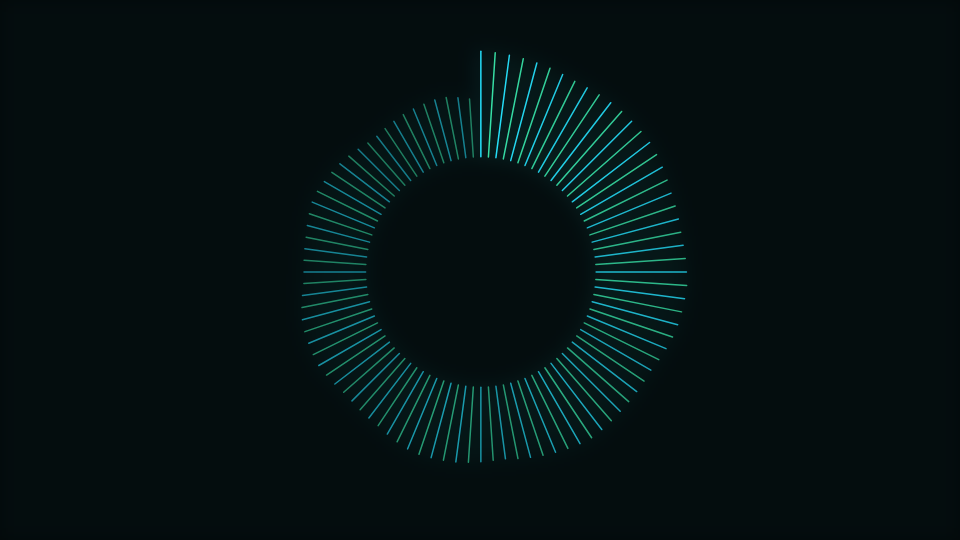
Two ways into the same branch
The radial layout is selected either by choosing this mode or by setting the Baseline control to its path option on another mode. Whichever route you take, the draw code takes the radial branch and returns before any of the linear code runs.
That early return is the reason a long list of controls is scoped away from this mode in the catalogue: baseline, mirroring, floor reflection, bar height, cap shape and peak hold all belong to code this mode never reaches. They are hidden rather than offered as sliders that move and change nothing, which is a distinction the user cannot otherwise make.
What you lose and what you gain
No peak markers and no cap shapes here. In exchange you get a composition with a reserved middle, which is the single most useful property in this engine if there is a logo, a title or a piece of cover art to place.
The only contained layout in the engine
Bottom-anchored bars are meant to sit flush on the frame edge, so the frame margin deliberately does not lift them off it. Containment would be wrong there: it would leave a visible gap under an equalizer that is supposed to stand on the floor.
A radial layout has no such excuse. Its strokes point outward in every direction, so an unbounded length leaves the frame on all four sides at once. This branch therefore limits each stroke's tip against the largest radius that stays inside the frame box, using the same soft knee as everywhere else, which makes it the one layout in this engine the Frame margin control genuinely governs.
The inner radius is fixed, and worth knowing
The ring the strokes start from is computed from a safe-zone value that this engine does not expose as a control. There is no Logo safe zone slider on Bars, so that value is always its fallback, and the inner radius is effectively a constant fraction of the shorter side of the frame with a small beat breath on top.
Practically: you can rely on the middle being clear, and you cannot resize it from here. If you need a reserved centre you can set, the Radial engine exposes it directly and the Logo engine sizes it from your artwork. This mode ships 96 bars, which is high enough that the ring reads as continuous.
Bar width and gap, and why they used to do nothing
In the linear layout a bar is a filled rectangle, so Bar width and Bar gap set its geometry directly. In the radial layout a bar is a stroke, so the same two controls have to become a line width instead.
The first version derived that line width from the bar width in absolute terms, and at this mode's shipped bar count the result never escaped the minimum floor. Both controls moved and no pixels changed. The line width is now scaled around the authored default, which keeps the shipped look identical while making the declared range effective, and it is bounded at both ends so a stroke cannot become a wedge.
When to reach for it
Cover loops, profile-picture animations, square and vertical formats, and any case where you want an equalizer that is legible as an equalizer while leaving the centre of the composition free. Out of 138 modes it is one of the small group that survives being cropped to a circle.
Open Radial Bars or the editor. For the same readout in a straight line, read The Center Mirror Mode: Half the Headroom, Both Ways, and for the artwork itself, The Kinetic Reveal Mode: Assembling a Mark Across a Bar.
Reviewed by the editorial team. Report a correction.
Keep reading
Was this page helpful?
Anonymous. Only this page’s address and your yes/no are recorded, and only if you allowed analytics cookies.
Ready to make your own?
Open the editor, drop in a track, and export a watermark-free video: free, no account.
Open the Editor