The Pulse Orb Mode: A Gradient, a Ray Fan and a Reserved Middle
Pulse Orb is the Radial engine's default and its simplest scene: one radial gradient, one fan of rays over it, and a centre that geometry is not allowed to cross.
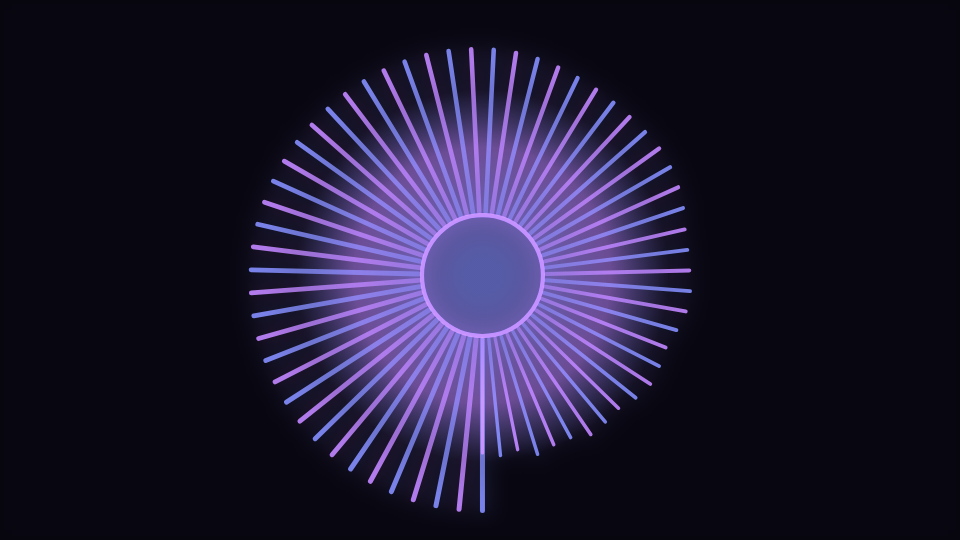
Pulse Orb is what opens when you pick the Radial engine without choosing anything else: a bounded audio-deformed orb surrounds the center safe zone. Being the default is a design constraint, not a label, and it shows in how little the mode does.
Three passes and nothing else
The orb is a radial gradient whose outer radius sits halfway between the inner and outer radius controls, scaled by the shared audio envelope and the beat pulse. Its stops run from a translucent centre through a mid tone to fully transparent at the edge, so the orb has no boundary to look at. That is deliberate: a filled circle with a hard edge changes size visibly and reads as a balloon.
Over that goes a full three hundred and sixty degree fan of rays, the same routine every other mode in the engine uses, with the ray count clamped into a range specific to this mode so the fan stays dense whatever Symmetry is set to. Then the accent ring is stroked at the inner radius. That is the entire mode.
The simplest scene is the best diagnostic
Because there is so little here, this is the mode to open when you want to hear what an audio control is doing. Move Sensitivity, Audio contribution or Beat response here and the change is unambiguous, then carry the setting to a busier mode.
The middle is reserved, by two controls at once
Two independent things can claim the centre of the frame: Inner radius and Logo safe zone. Geometry has to clear whichever is larger, or the safe zone only works until someone changes the other one. The engine takes the maximum of the two, and then limits even that against the frame so an extreme value cannot push the reserved circle past the edge of the composition.
That reserved circle is where a logo, a title or a piece of cover art goes. Nothing in this mode will ever be drawn inside it, at any audio level, which is the promise the safe zone makes. If you want the artwork handled by the engine itself rather than composited over it, the Logo engine is built for that instead.
What a ray actually responds to
A ray's length combines four terms: its own band level, the beat pulse, a smaller onset contribution, and a fixed floor so the fan never disappears entirely in silence. Radial deformation multiplies the band term specifically, so it changes how much the fan differentiates between quiet and loud rather than how long the rays are overall. This mode ships it at 0.28.
Each ray is stroked with a gradient along its own length, faint at the root and strong at the tip, and its width rises with its band and the pulse. That gradient is why the fan reads as light rather than as a diagram, and it is drawn per ray rather than cached, which is part of why the engine's published budget sits at 128 elements by default and 64 on mobile.
The primary audio route is in scope for this mode, so Primary audio source, Audio contribution and Audio dynamics all apply. Ring count and Rotation are not: this mode draws one fan and does not turn, and the catalogue scopes both away rather than offering sliders that do nothing. The mode ships a ring count of 1 for exactly that reason.
When to reach for it
Podcast art, single covers, audiograms, anything square or vertical, and any case where the visual is a frame around something else rather than the subject. It is the least busy centred scene in the catalogue, and out of 138 modes it is the one most likely to still look right at 200 pixels wide.
Open Pulse Orb or the editor. For the elaborate end of the same engine, read The Mandala Mode: Layered Ray Fans That Count Down.
Reviewed by the editorial team. Report a correction.
Keep reading
Was this page helpful?
Anonymous. Only this page’s address and your yes/no are recorded, and only if you allowed analytics cookies.
Ready to make your own?
Open the editor, drop in a track, and export a watermark-free video: free, no account.
Open the Editor