The Waveform Filled Mode: A Closed Path Back to the Baseline
The Waveform engine's area mode closes its trace back along the baseline, fills it translucently, and then strokes the outline on top. Here is why the order matters and what the depth control does when there is only one row.
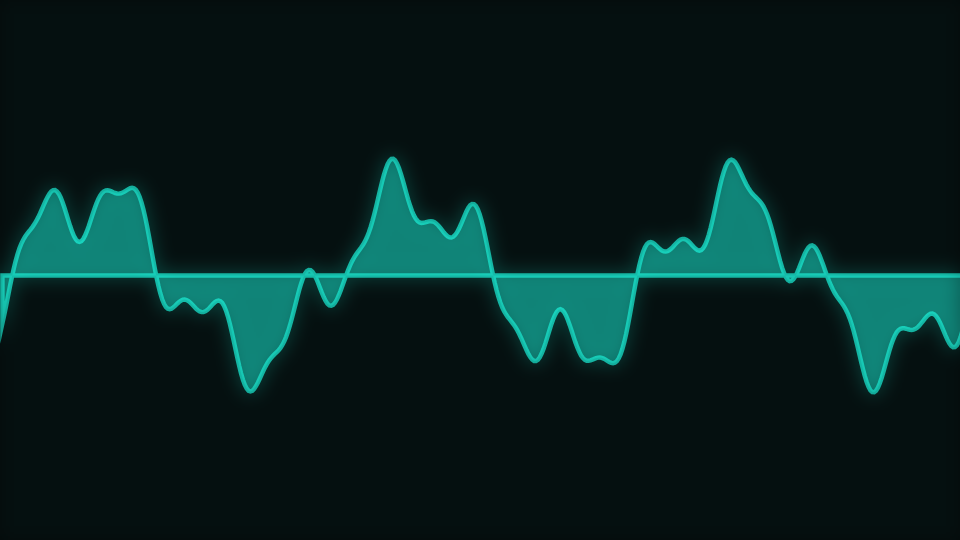
The catalogue describes this mode as one where a translucent waveform area holds a stable idle silhouette. It is the Waveform engine drawing the same time-domain trace as its line modes, with one extra step at the end of every row, and that step changes the character of the thing completely.
Close, fill, then stroke
When the trace reaches the right edge, this mode adds two more points: down to the baseline at the right, then across to the baseline at the left. Closing the path turns an open curve into a region. The region is filled first, at a low alpha built from a fixed floor plus level and beat contributions, and only then is the outline stroked.
The order is load-bearing. Stroking first and filling second would lay the translucent fill over the outline and soften it; filling first leaves the stroke crisp on top of its own shading. It is the same reason a chart library draws its area before its line.
The baseline is the trace's anchor, not the frame's
The closing points go to the waveform's own centre line, halfway down the frame, rather than to the bottom of the canvas. So the area hangs both upward and downward from the middle and the silhouette at silence is a flat band rather than a filled lower half. That is what the catalogue means by a stable idle silhouette: with no audio playing the mode still has a shape, which matters a great deal for a scene that might be on screen before a track starts.
The swing is limited, the sample is not
Gain reaches 5 from the control and is multiplied again by the beat pulse, the onset burst and the level, so the raw excursion can be several frame heights. What the engine limits is the OFFSET from the baseline, through a soft knee, rather than the sample value itself. The waveform's shape survives intact and only its reach is bounded, which is the difference between a loud passage that fills the frame and one that turns into a square wave.
A depth control with nothing to space
Ribbon depth is in scope for this mode, and on a multi-row mode it is the gap between rows. This mode draws one row, so there is nothing for it to separate. The value is still computed, and it is still SUBTRACTED from the headroom the swing is allowed to use, so turning it up here quietly reduces how far the waveform can reach rather than adding any depth. Leave it low on this mode.
Scrolling, smoothing and colour
The sample window travels with the motion clock, so the trace scrolls rather than being redrawn in place. That is how Speed reaches this engine at all. Smoothing is a three-tap average across neighbouring samples, clamped below 1 so it can never fully erase the signal. And Color mode splits two ways here: the duo setting strokes from the palette, and anything else strokes a gradient spanning the frame width.
The mode ships Opacity at 0.86. That one is applied by the engine before the draw module is even called, so it composes with the fill's own alpha rather than replacing it.
One more shipped default that cannot be reached
This mode ships a geometry-shape value. That control belongs to five engines in the catalogue and Waveform is not among them, so it appears in no panel here, and the string does not occur anywhere in this engine's draw module. Two of the 23 engines in the catalogue carry a default like this in one of their modes, and both are worth knowing about before you spend ten minutes hunting for a slider.
When to reach for it
Acoustic material, singer-songwriter releases, podcast and audiobook clips, and any video where the waveform IS the subject rather than the decoration. The area reads at a distance where a one-pixel line does not. For the engine's most unusual mode, read The Oscilloscope/Lissajous Mode; for the same trace bent into a circle around artwork, The Waveform Ring Mode: The Trace Bent Around a Reserved Middle.
Open the Filled mode in the gallery or go to the editor.
Reviewed by the editorial team. Report a correction.
Keep reading
Was this page helpful?
Anonymous. Only this page’s address and your yes/no are recorded, and only if you allowed analytics cookies.
Ready to make your own?
Open the editor, drop in a track, and export a watermark-free video: free, no account.
Open the Editor